
CONSOLE
HELP

The "Reporting Module" allows you to view the summary and breakdown details of the broadcasted message.
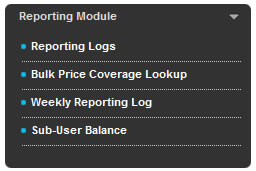
Fig 2-1
| Note: MMS is temporarily disabled, as this module is experiencing some exciting upgrades. Stay tuned for an enhanced version of our MMS offering. |
|---|

The "Reporting Logs" allows you to search for a report summary of broadcasted messages. It consists of various search functions as shown in Figure 2.1-1.
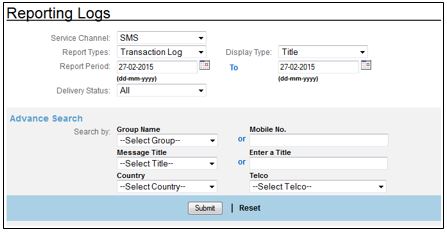
Fig 2.1-1
2.1.1 Service Channel (Refer to Fig 2.1-1)
CONSOLE currently supports sending of SMS and MMS. You can choose either one of the options to send your Bulk Messages. The usage of SMS or MMS in the Service Channel is based on your package agreement with Macrokiosk.
2.1.2 Report Types (Refer to Fig 2.1-1)
There are three report types available which are "Transaction Log", "Rejected Log", and "Network Query Log".
2.1.2.1 Transaction Log
Transaction Log is to display the detailed list of messages, broadcasted within a specific time frame.
SMS
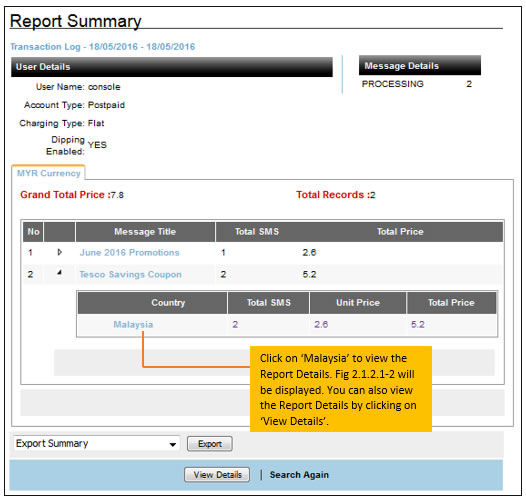
Fig 2.1.2.1-1
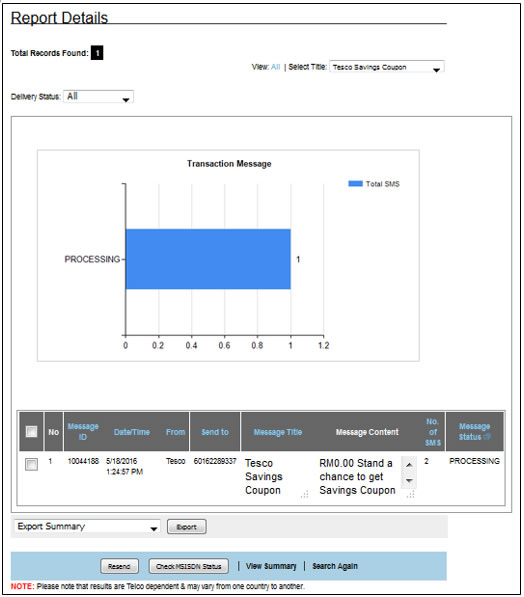
Fig 2.1.2.1-2
A Transaction Log provides:
-
The summary and details of messages that have been sent to the Telco.
-
All broadcasted messages, with or without a Message Title will be displayed.
2.1.2.1.1 View Details
The "View Details" button in the Report Summary is to view the report details (as shown in Fig 2.1.2.1-2).
Resend (Refer to Fig 2.1.2.1-2)
If you want to resend the message, due to "Undelivered" status, tick the checkbox of the appropriate record and click "Resend".
Check MSISDN Status (Refer to Fig 2.1.2.1-2)
This function is to check if the mobile number is still active/inactive/temporariliy inactive mode. Refer to Section 2.1.2.3 Network Query Log on how to operate the "Check MSISDN status". Note that only successful results will be logged into the "Network Query Log". Failed results will be logged into "Rejected Log".
View Summary (Refer to Fig 2.1.2.1-2)
This function takes you to the summarized version of the reporting log.
Search Again (Refer to Fig 2.1.2.1-2)
This function lets you perform another search.
2.1.2.2 Rejected Log
Rejected Log consists of Invalid Broadcast Time, invalid Account, Invalid Parameter, System Error, Blacklisted Log, NQ-Address Book, NQ-MT Broadcast, NQ-Reporting. Please refer to table 2.1.2.2-1 for more details.
Invalid Broadcast Time |
Certain Telcos practice timeframe limits to send promotional or marketing messages to mobile subscribers. This is to minimize disturbances at irregular hours. Messages that are sent out of the allowed broadcast time will be listed in the ‘Rejected Log’ for your reference and further action. Messages broadcasted to these mobile numbers will be rejected and logged into this category. |
Invalid Account |
Invalid Account is displayed when the following happens:
|
| Invalid Parameter | Invalid Parameter is displayed when the following happens:
|
| System Error | This error is displayed when the following happens:
|
Blacklisted Log |
A Blacklisted Log consists of subscribers who have subscribed to blacklist their numbers in order NOT to receive promotional bulk messages. |
NQ-Address Book |
|
NQ-MT Broadcast |
|
NQ-Reporting |
|
Table 2.1.2.2-1
| Note: API & CONSOLE users will be able to view the Reporting Log in CONSOLE, to identify the rejected reasons. |
|---|
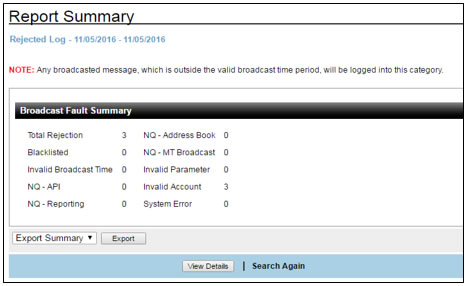
Fig 2.1.2.2-1
Click on "View Details" (Refer to Fig 2.1.2.2-1) and you can see Fig 2.1.2.2-2 below:
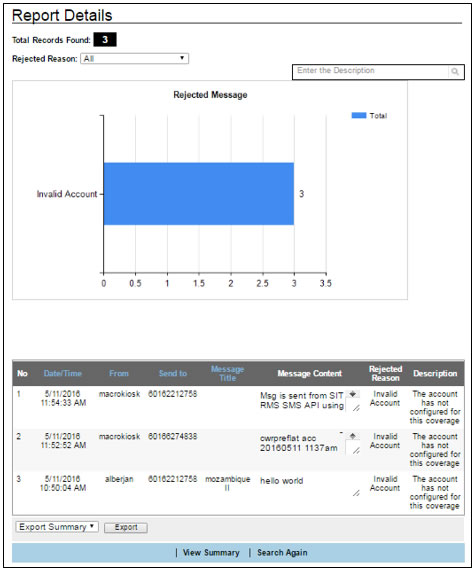
Fig 2.1.2.2-2
You can refer to the "Rejected Reason" column to identify the reason the MSISDN was rejected.
2.1.2.3 Network Query Log
The Network Query Log is to validate the list of mobile numbers before making a business decision, such as blasting messages to mobile subscribers, or performing "targeted promotions" to individuals in specific locations, based on the roaming network displayed. This is only applicable for SMS.
1. In the SMS Transaction Log, when you click on "View Details" you will be able to perform a network query search on mobile numbers by clicking on "Check MSISDN status". Refer to Fig 2.1.2.3-1.
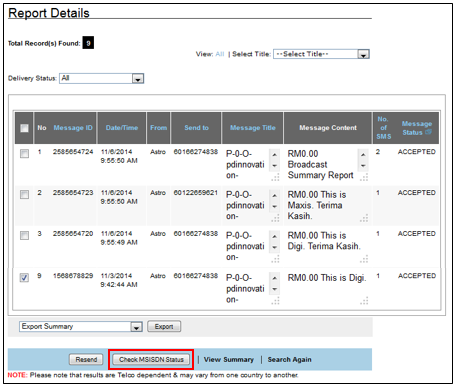
Fig 2.1.2.3-1
2. When the "Check MSISDN Status" has been clicked, a system prompt message requesting a confirmation will be displayed. When you click "Yes", Fig 2.1.2.3-2 will be displayed.

Fig 2.1.2.3-2
3. Click on the "Reporting Logs" link. Then from the "Report Types" drop down box, select "Network Query Log".
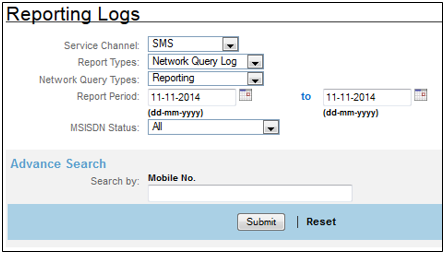
Fig 2.1.2.3-3
4. Select the module of the Network Query Log that you intend to see from the "Network Query Types".
5. Then select the "Date Range" and the "MSISDN Status" that you intend to see. Then click "Submit". You will be displayed with a "Report Summary" as shown in Fig 2.1.2.3-4 below.
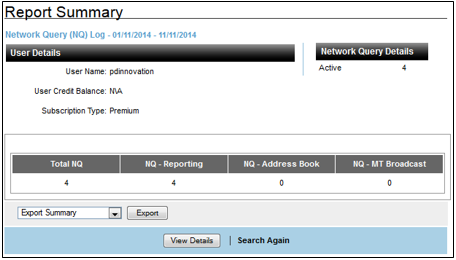
Fig 2.1.2.3-4
6. Then click "View Details". You will be able to view the details of the MSISDN that you ticked just now. Refer to Fig 2.1.2.3-5. In order to understand the columns displayed here refer to Table 2.1.2.3-1 and Table 2.1.2.3-2. Note that only successful results will be logged in the Network Query Log. Failed results will be logged in the "Rejected Log".
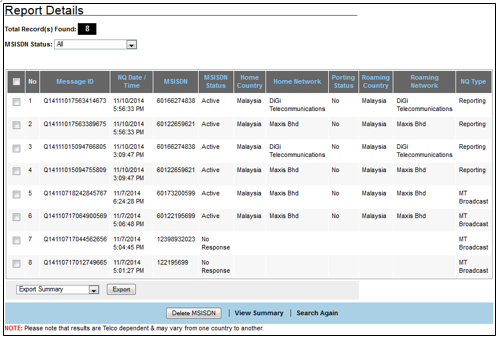
Fig 2.1.2.3-5
Field Name |
Description |
Message ID |
Message ID is given to tag each transaction. |
NQ Date/Time |
Refers to the Date and Time of the Network Query search. |
MSISDN |
Refers to the Mobile number that you are querying on. |
MSISDN Status |
'Active' / 'Inactive' or 'No Response'. Please refer to Table 2.1.2.5-2 for these descriptions. |
Home Country |
To identify the country that the MSISDN was registered in. |
Home Network |
To identify the current Telco that the MSISDN is associated with. |
Porting Status |
To identify if the number has been ported to another network operator. |
Roaming Country |
To identify the roaming country name of the MSISDN. |
Roaming Network |
To identify the roaming network operator of the MSISDN. |
Table 2.1.2.3-1
Description of MSISDN Status:
MSISDN Status |
Description |
Active |
Indicates that the mobile number is active and valid. The mobile number can be in the following states:
|
Inactive |
Indicates that the mobile number is terminated or an unidentified mobile number. |
Pending |
Indicates that the request has been sent to Telco and is pending query results. |
Temporarily Inactive |
Indicates that the mobile number is in the following states:
|
No Response |
Indicates the network operator’s system error or an invalid number. Invalid refers to wrong random numbers such as 012123456789. |
Table 2.1.2.3-2
Based on the MSISDN status, you can choose to either retain or delete the mobile number if it returns a consecutive "Inactive" status for many months. You can check on the check box of the relevant mobile number and click the "Delete MSISDN" button (Fig 2.1.2.3-5).Please note that when the "Delete MSISDN" button is clicked, the number will be permanently deleted from the Address Book.
Note:
- This is an additional feature that requires subcription.
- Network Query results may not be 100% accurate as it is Telco dependant & may vary from one country to another.
2.1.3 Display Type (Refer to Fig 2.1-1)
This section allows you to search for Reporting Logs by country and message title. Fig 2.1.3-1 displays the search results when you perform a search by "Country". The Total SMS, Unit Price and Total Price for the message that was broadcasted will be displayed.
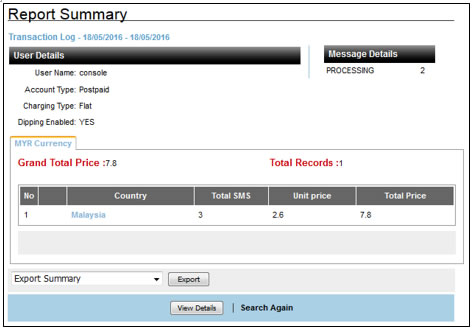
Fig 2.1.3-1
You can drill down to get more information about the transaction log by clicking on the name of the country or clicking on"View Details". Fig 2.1.3-2 will be displayed.
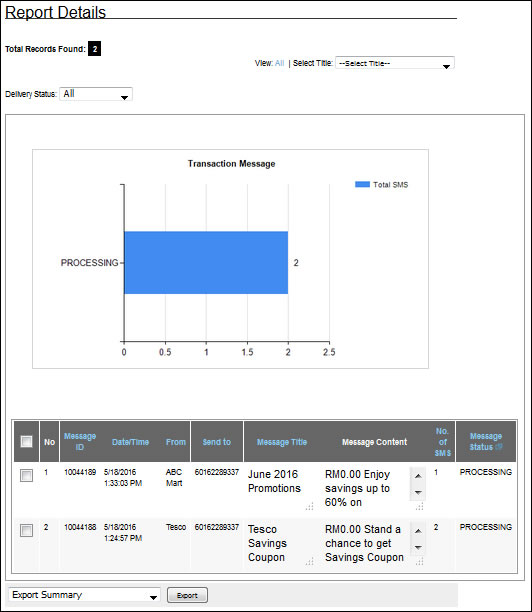
Fig 2.1.3-2
2.1.4 Report Period (Refer to Fig 2.1-1)
A report period allows you to search for a series of transactions within the specific duration.

Fig 2.1.4-1
1. Enter the Report Period (Start and End dates) to search for report summary.
2. The report period is applicable only for searches within the same month only.
2.1.5 Delivery Status / Delivery Notifications (DN) (Refer to Fig 2.1-1)
DN or Delivery Notification refers to the status of the message sent to the mobile recipient. DN Help provides a full description of the abbreviation. For example, PROCESSING indicates that the message is still being processed in MK gateway and has not been delivered. (Please refer to Table 2.1.5-1 or "DN Status Description" for more details).
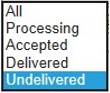
Fig 2.1.5-1
1. Select the Delivery Status you intend to view from the drop down list.
Delivery Notification Status |
Description |
|---|---|
Processing |
Message is still processing at MACROKIOSK's gateway. |
Accepted |
Message has been delivered to network operator's SMSC. |
Delivered |
Message has been delivered to network operator's SMSC with succesful delivery status. |
Undelivered |
Message has been delivered to network operator's SMSC with failed delivery status. |
Table 2.1.5-1
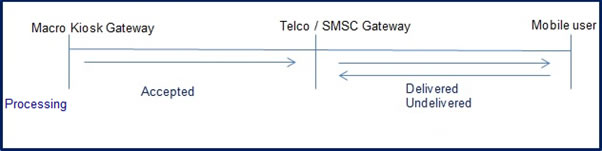
Fig 2.1.5-2
DN Status Description:
PROCESSING
Message is currently being processed.
End Result:
Message is currently being processed at MACROKIOSK'S Gateway.
End Result:
Message is currently being processed at MACROKIOSK'S Gateway.
ACCEPTED
Message has been delivered to SMSC without DN from Telco.
End Result:
Mobile subscriber may or may not have received the SMS.
ACCEPTED is the final acknowledgement from Maxis & Digi in Malaysia.
There are no further DNs from both the telcos. Message has reached SMSC and is pending for final DN to be returned.
End Result:
Mobile subscriber may or may not have received the SMS.
ACCEPTED is the final acknowledgement from Maxis & Digi in Malaysia.
There are no further DNs from both the telcos. Message has reached SMSC and is pending for final DN to be returned.
DELIVERED
SMSC confirmed that the mobile subscriber has received the message by returning successful DN. End Result:
Mobile subscriber has received the message successfully.
Mobile subscriber has received the message successfully.
UNDELIVERED
SMSC has confirmed that the message failed to be delivered to the mobile subscriber.
End Result:
Message has failed to reach the mobile subscriber.
End Result:
Message has failed to reach the mobile subscriber.
2.1.6 Advance Search
To save time sorting through the long list, you can use the 'Advence Search' functions. Search through either the drop down list or manually keying in the Mobile Number or Title.
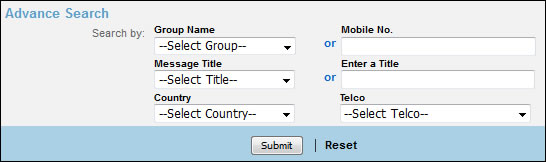
Fig 2.1.6-1
-
By default, if no selection is made in the "Message Title" field, all transactions with or without the Message Title will be displayed on the page.
-
Click "Submit" to make a quick search, or click "Reset" to clear the input/setting on the current page.
Bulk Price Coverage Lookup is a complete list of prices that CONSOLE supports for a specific account.
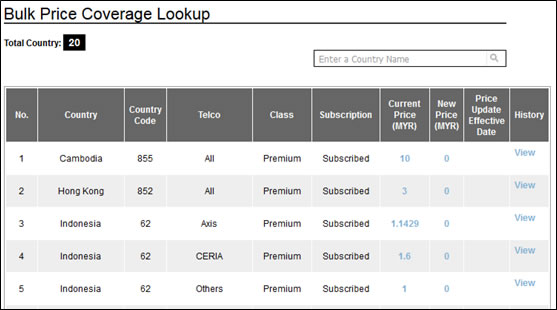
Fig 2.2-1
Note: Negative value will have a bracket. e.g.:-10 = (10)
You can mouse over the "Current Price" & “New Price” column to identify the prices of each country. You can click on the “Current Price”, “New Price” and “History” to view the price of every tier. If there are changes in the pricing, it can be viewed when you click on “View” under the “History” column.
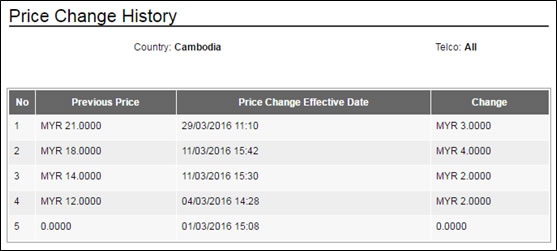
Fig 2.2-2
Subscribed and Unsubscribed in Fig 2.2-1 informs whether MACROKIOSK’s gateway is connected to a Telco or not.
Class refers to the package that you have signed up for when you purchased the service. The following is the definition of the ‘Class’ column.
| Class | Definition |
|---|---|
| Premium | This class has superior link connection and the highest rate of successful deliveries compared to Standard and Economy class. The Customer Service support from Telco for this class is also better compared to the rest. |
| Standard | This class is moderately efficient in the delivery of messages compared to Premium. The response time for problem fixes is relatively good. |
| Economy | This class is good in the delivery of messages. However the response time from Telco for this class, may or may not be as excellent compared to Standard or Premium. |
Table 2.2-1
Note: NOT all countries have Classes. Please check with your respective Account Managers.
The table 2.2-2, displays the Premium, Standard & Economy details for various countries. Please note that this is May 2016 release. Details in this table are subject to change without prior notice. Do get in touch with your Account Manager for latest updates.
| SENDER ID | Content Type | Service Type | DN | MNP Checked | Concatenate | Telco Coverage | Remark | |
| Macau | ||||||||
| PREMIUM | No offering yet | |||||||
| STANDARD | Dynamic | Roman & Unicode | Promotional & Transactional | Yes | Yes | Yes | ALL | |
| ECONOMY | longcode | Roman & Unicode | Promotional & Transactional | Yes | Yes | Yes | ALL | |
| CHINA | ALL | |||||||
| PREMIUM | Fixed longcode (+106xxxxxxxxx) | Roman & Unicode -Pre registration needed |
Transactional | Yes | Yes | Yes | ALL | - Content registration required (only for transactional/customer care content) - For non-OTP content, '回复TD拒收' needs to be included in the content for user to opt-out |
| STANDARD | Random longcode with international prefix | Roman & Unicode | Promotional & Transactional | Yes | Yes | Yes | ALL | - No content registration required but noticed with high content filtration possibility. - Promo content still can be sent through although it will be extremely slow/low volume. |
| ECONOMY | Random longcode with international prefix | Roman & Unicode | Promotional & Transactional | Yes | Yes | Yes | ALL | Support transactional and promotional but it is a SS7 route that has the risk of being filtered. |
| SINGAPORE | ||||||||
| PREMIUM | Default with 7-series shortcode. One S/c per sub-account * Setup & monthly fee applies |
Roman & Unicode | Promotional & Transactional | Yes | No | Yes | ALL | |
| STANDARD | Dynamic | Roman & Unicode | Promotional & Transactional | Yes | Yes | Yes | ALL | |
| ECONOMY | Random long code | Roman & Unicode | Promotional & Transactional | Yes | Yes | Yes | ALL | |
| HONG KONG | ||||||||
| PREMIUM | No offering yet | |||||||
| STANDARD | Dynamic | Roman & Unicode | Promotional & Transactional | Yes | Yes | Yes | ALL | |
| ECONOMY | longcode | Roman & Unicode | Promotional & Transactional | Yes | Yes | Yes | ALL | |
| THAILAND | ||||||||
| PREMIUM | Fixed Sender ID: 021158814 *Dynamic Sender ID: Registration Required |
Roman & Thai | Promotional & Transactional | Yes | Yes | Yes | ALL | |
| STANDARD | Dynamic sender ID | Roman& Thai | Promotional & Transactional | Yes | Yes | Yes | ALL | |
| ECONOMY | Random longcode | Roman& Thai | Promotional & Transactional | Yes | Yes | Yes | ALL | "AIS" will be masked as Alpha |
| VIETNAM | ||||||||
| PREMIUM | Fixed Sender ID: etracker *Dynamic Sender ID: Registration Required |
Roman & Unicode | Promotional & Transactional | No | Yes | Yes | ALL | |
| STANDARD | Random Longcode | Roman & Unicode | Promotional & Transactional | No | Yes | Yes | ALL | |
| ECONOMY | Random longcode | Roman & Unicode | Promotional & Transactional | No | Yes | Yes | ALL | |
| PHILIPINES | ||||||||
| PREMIUM | Fixed Sender ID: etracker *Dynamic Sender ID: Registration Required |
All telco not support unicode | Promotional & Transactional | Yes | Yes | Yes | ALL | |
| STANDARD | Fixed Sender ID: etracker *Dynamic Sender ID: Registration Required |
All telco not support unicode | Promotional & Transactional | Yes | Yes | Yes | ALL | |
| ECONOMY | Random longcode | All telco not support unicode | Promotional & Transactional | Yes | Yes | Yes | ALL | |
| TAIWAN | ||||||||
| PREMIUM | Fixed Sender ID: '931181946' | Roman and Unicode | Promotional & Transactional | No | Yes | No | ALL | |
| STANDARD | Random longcode | Roman and Unicode | Promotional & Transactional | No | No | ALL | ||
| ECONOMY | Random longcode | Roman and Unicode | Promotional & Transactional | No | No | ALL | ||
| INDONESIA | ||||||||
| PREMIUM | Pre register sender ID *MG of 7,000 SMS applies for sender ID registeration for Indosat |
Telkomsel: Only Roman character, | Promotional & Transactional | Yes | Yes | Yes | Telkomsel, Indosat, XL, Smartfren, Esia | |
| STANDARD | *Dynamic Sender ID Pre register sender ID |
Telkomsel: Only Roman character, other telcos are full features | Promotional & Transactional | Yes | Yes | Yes | ALL | Telkomsel, XL require pre register sender ID. |
| ECONOMY | Random longcode | Telkomsel: Only Roman character, other telcos are full features | Promotional & Transactional | Yes | Yes | No | ALL | |
| MALAYSIA | ||||||||
| PREMIUM | Fixed Sender ID: 66688 | Roman & unicode | Promotional & Transactional | Maxis n digi NO, others yes | using TGA | All Telco support; Except DiGi. Umobile will merge every 3 SMSes. |
100% MNO; 80% MNVO |
RM0.00<space> will be auto appended in the first SMS message.This will consume an extra 7 characters from the total SMS chars counted. |
| STANDARD | Random Longcode | Roman & unicode | Promotional & Transactional | Yes | Yes | Yes | 100% MNO; 100% MNVO |
RM0.00<space> will be auto appended in the first SMS message.This will consume an extra 7 characters from total SMS chars counted. |
| ECONOMY | Random Longcode | Roman & unicode | Promotional & Transactional | Yes | Yes | Yes | 100% MNO; 100% MNVO |
RM0.00<space> will be auto appended in the first SMS message.This will consume an extra 7 characters from the total SMS chars counted. |
Table 2.2-2
The weekly reporting log displays the number of SMS that has been sent out for the last 7 days. This is automatically generated by the system.
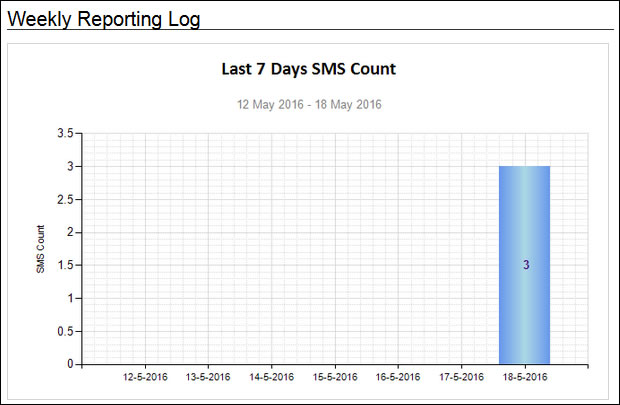
The system will not show the count across two different months. Only 1 month selection is allowed.
This page will only be applicable to multiuser account holders. Multiusers will be able to view the current balance and balance history of sub-users.
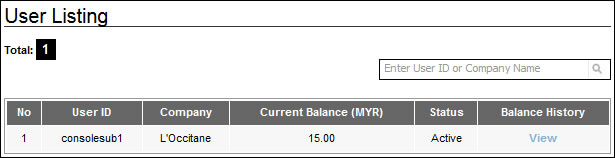
Fig 2.4-1
Click on ‘View’ to display the Balance History. Refer to Fig 2.4-2.
| User Status | Description |
|---|---|
| Active | This user’s account is still valid and with regular or frequent transactions. |
| Suspended | This user’s account cannot be used, since he/she has not settled his payment or has been blacklisted. The account can be activated again subject to approval. |
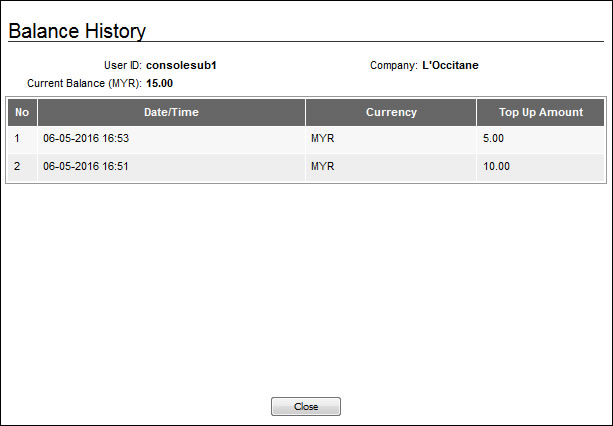
Fig 2.4-2

