CONSOLE
HELP

-
"Label Manager Module" is an optional module that allows you to define and configure your
preferred Interface layout on the system. -
You may upload your company logo and customize your preferred theme color.
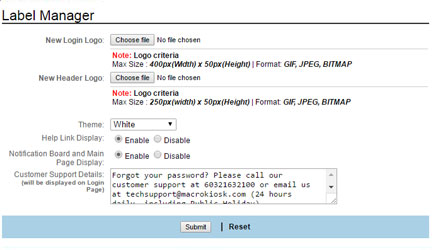
Fig 8-1
-
Click the Browse button to locate your file for New Login Logo.
- Maximum file size: 400 pixels (Width) x 50 pixels (Height)
- Format: GIF, JPEG, BITMAP

-
Click the Browse button to locate your file for New Header Logo.
- Maximum file size: 250 pixels (Width) x 50 pixels (Height)
- Format: GIF, JPEG, BITMAP
-
Select your preferred "Theme" color for the display. By default, the color option is "White."
-
This section allows you to hide or display the ‘Help’ button on the default landing page.
-
This section allows you to compose & display notifications on the default landing page. Enable/Disable the notification messages to be displayed on the landing page
-
This section is for you to display your personalized customer support details on the login page:
- The support information
- Your personalized information.
-
Once you have keyed in your Customer Support Details, click ‘Submit’ to confirm the setting, or click ‘Reset’ to clear the input/setting on the current page
-
Re-login is required after the layout is changed.

